
A legal brief submission guide defines the exact steps and requirements needed to file a legal document that courts will accept and judges will read seriously. The formal term for this document is a "brief," and it serves as your written argument in a case. Submitting one incorrectly can get it rejected before a judge reads a single word. This guide covers the core components, formatting rules, filing procedures, and common pitfalls that affect both individuals and legal professionals. Follow these steps and your brief stands a real chance of making an impact.
What are the essential components and formatting rules for a legal brief?
A legal brief has a defined structure, and courts expect every element to be present. Missing any one of them is grounds for rejection.
The standard components of a brief include:
- Title page: Case name, court name, docket number, and party identification
- Table of contents and table of authorities: Required in most appellate briefs
- Statement of facts: A neutral, accurate account of the relevant facts
- Legal arguments: Your core claims, supported by case law and statutes
- Conclusion: A clear statement of the relief you are requesting
- Certificate of service: Proof that all parties received a copy
- Certificate of compliance: Confirmation that the brief meets word and page limits
Formatting rules vary by court, but common standards include 12-point Times New Roman or Century Schoolbook font, one-inch margins, and double spacing. Federal appellate courts set strict word limits, typically 13,000 words for opening briefs. Cover colors also differ by brief type. Blue covers are standard for appellant briefs in federal courts, while red covers apply to appellee briefs.
Citation standards require proper Bluebook or ALWD format depending on the jurisdiction. Personal identifiers such as Social Security numbers and financial account numbers must be redacted before filing. Rules for redaction are not optional. Courts treat improperly redacted filings as deficient.

Pro Tip: Never assume the rules from one jurisdiction apply to another. Even judges within the same courthouse may have unique formatting preferences, so always pull the local rules directly from the court's website before drafting.
How to prepare and organize your legal brief submission effectively
Preparation is the phase where most briefs are won or lost before a single argument is written.
Start by assembling your research. Identify the controlling statutes, binding case law, and any persuasive authority relevant to your argument. Organize your evidence by issue so each section of your brief has a clear factual foundation. A well-organized case preparation checklist prevents gaps in your argument and keeps the drafting process on track.
Next, read the local court rules in full. Pay attention to:
- Filing deadlines and any standing orders from the assigned judge
- Required number of paper copies alongside electronic submissions
- File naming conventions and size limits for uploaded documents
- Accepted file formats (most courts require text-searchable PDFs)
Trial brief deadlines are typically set 30 or more days before trial, and late filings are often struck from the record entirely. Missing a deadline requires a motion for extension with good cause, and courts can dismiss appeals outright for late filings. That consequence alone makes deadline planning non-negotiable.
Work backward from your filing deadline using this schedule:
- Set your final submission date
- Reserve the day before for technical troubleshooting with the e-filing system
- Block time two to three days before for final formatting review
- Complete your substantive draft at least five days before the deadline
- Begin research and outlining at least two weeks before the draft is due
Planning backward from deadlines is the single most effective way to avoid last-minute technical failures. E-filing systems go down. PDFs fail conversion. Accounts lock out. Building in buffer time is not caution. It is standard practice.
What are the step-by-step procedures to submit a legal brief correctly?
Filing a brief correctly requires more than good writing. The procedural steps are just as critical as the substance.
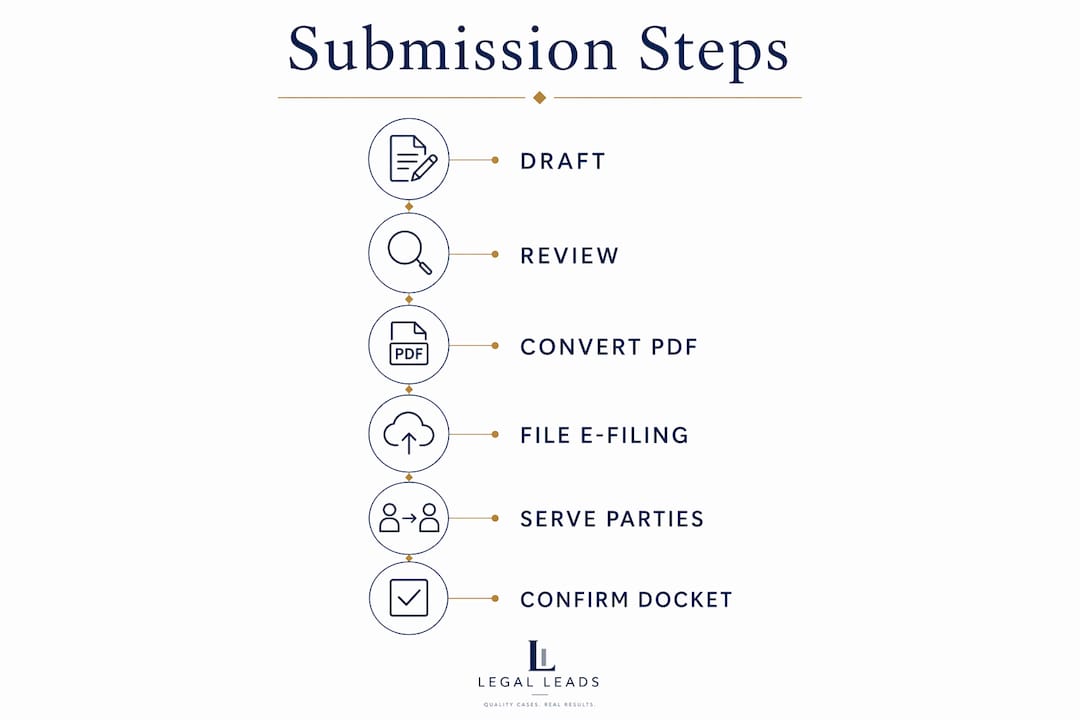
Step 1: Draft with clarity and precision. Write each argument section with a clear thesis, supporting authority, and application to your facts. Avoid overloading paragraphs with tangential details. Judges read dozens of briefs. Clear, direct writing gets noticed. For guidance on presenting your legal situation clearly, review how to communicate your legal problem before you draft.
Step 2: Conduct multiple review passes. A single read-through misses critical errors. Divide your review into four dedicated passes: substance and logical flow, citation accuracy, grammar, and formatting compliance. Each pass has a different focus, and combining them leads to oversights that cause rejections.
Step 3: Generate a text-searchable PDF. OCR is mandatory for any scanned document submitted electronically. Flat image PDFs are rejected by most courts. The correct method is to use "Save As" or export directly from your word processing software. This produces a fully searchable PDF without the quality loss that comes from scanning a printed page.
Step 4: File through the court's e-filing system. Log in to the court's electronic filing portal and follow the file naming conventions exactly. Most systems specify formats like "LastName_v_LastName_OpeningBrief.pdf." Upload the document, confirm the file size is within limits, and complete all required fields before submitting.
Step 5: Serve all parties and file proof. After filing, serve copies on all opposing parties using the method required by court rules, whether electronic service, mail, or hand delivery. Then file your certificate of service promptly. Failure to include certificates of service and compliance is one of the most common causes of rejection.
Step 6: Monitor your docket confirmation. Check the court's electronic docket within 24 hours of filing. Confirm the brief appears correctly, the filing date is accurate, and no deficiency notices have been issued.
Pro Tip: Schedule your final submission for mid-morning on a business day. Avoid filing on Fridays or the day before holidays. Clerk's offices are less responsive to deficiency notices at those times, and you want time to fix any issues before the deadline passes.
What common errors and pitfalls should be avoided during legal brief submission?
Most brief rejections trace back to a short list of preventable mistakes.
- Ignoring cover sheet color requirements. Federal appellate courts assign specific colors by brief type. Filing an appellant reply brief with a gray cover instead of yellow is a technical defect that triggers rejection.
- Missing the filing deadline. Courts can dismiss appeals for late filings. If you need more time, file a motion for extension before the deadline expires, not after.
- Submitting unsearchable PDFs. Scanning a paper brief and uploading the image file violates electronic filing rules in most jurisdictions. Always export directly from your word processor.
- Omitting certificates of service or compliance. These are not optional attachments. Courts treat their absence as a deficiency requiring correction or causing outright rejection.
- Overloading the brief with unnecessary detail. A brief packed with marginally relevant case citations and repetitive arguments signals poor judgment to the judge. Tight, focused writing is more persuasive than volume.
Judges view compliance with technical rules as a direct indicator of an attorney's attention to detail and overall reliability. A brief that violates formatting rules may be disregarded entirely, regardless of how strong the underlying argument is. Technical precision and substantive quality are not separate concerns. They reinforce each other.
Jurisdictional requirements for margins, fonts, and cover colors vary widely. When the rules are unclear, contact the clerk's office directly. Courts prefer a clarification call to processing a deficient filing.
Key Takeaways
Successful legal brief submission depends on formatting compliance, deadline planning, and procedural accuracy in equal measure.
| Point | Details |
|---|---|
| Structure is mandatory | Every brief must include a title page, statement of facts, legal arguments, conclusion, and certificates of service and compliance. |
| Formatting rules vary by court | Always pull local rules directly from the court's website; never assume rules transfer across jurisdictions. |
| Plan backward from deadlines | Finish your draft at least five days early to allow time for review, PDF conversion, and e-filing troubleshooting. |
| Use text-searchable PDFs | Export directly from your word processor. Scanned image PDFs are rejected by most courts for lacking searchable text. |
| Multiple review passes prevent rejection | Review substance, citations, grammar, and formatting in separate passes to catch every category of error. |
Why technical compliance matters as much as your argument
After years of working with legal documents and the professionals who file them, one pattern stands out clearly. The briefs that get rejected are rarely weak on substance. They get rejected because someone assumed the formatting rules were secondary to the argument.
That assumption is wrong. Judges rely on brief formatting as a direct signal of professionalism and case seriousness. A brief with the wrong font, a missing certificate, or an unsearchable PDF tells the judge something about the filer before a single argument is read. That first impression is hard to recover from.
The practical lesson I keep returning to is this: call the clerk's office when you are unsure. Most legal professionals skip this step because it feels unnecessary. It is not. Clerks know the local rules better than any published guide, and they would rather answer a question than process a deficient filing twice.
One more thing that separates strong briefs from average ones: anticipating counterarguments. Addressing opposing arguments directly within your brief signals that you understand the full scope of the issue. Judges notice when a filer has thought through the other side. It builds credibility in a way that pure advocacy cannot.
The brief is your one written opportunity to make your case. Treat the procedural requirements with the same seriousness you give the legal arguments. They are not obstacles. They are the standard.
— Admin
Legalleads connects you with attorneys who know how to file
Filing a legal brief correctly requires knowledge of court-specific rules, tight deadlines, and technical filing systems. Getting it wrong costs time and, in some cases, the case itself.

Legalleads connects individuals and legal professionals with qualified attorneys who handle brief preparation and submission across practice areas including personal injury, family law, employment law, and criminal defense. Describe your legal situation in plain English and receive a professional case brief in under two minutes. From there, Legalleads matches you with a verified attorney within 24 hours. No calls, no complicated forms. Find a qualified attorney through Legalleads and get your brief filed right the first time.
FAQ
What is a legal brief submission?
A legal brief submission is the formal process of filing a written legal argument with a court, following specific procedural and formatting rules set by that jurisdiction. The brief presents your legal position, supporting case law, and the relief you are requesting.
How do I submit a legal brief electronically?
Most courts require electronic filing through their designated e-filing portal using text-searchable PDFs that comply with file naming conventions and size limits. Export your document directly from your word processor rather than scanning a printed copy.
What happens if I miss a legal brief filing deadline?
Missing a filing deadline can result in your brief being struck from the record or your appeal being dismissed. File a motion for extension with good cause before the deadline expires if you need more time.
What must a legal brief include to avoid rejection?
A complete brief must include a title page, statement of facts, legal arguments, conclusion, certificate of service, and certificate of compliance confirming it meets word or page limits. Missing any of these elements typically causes the court to issue a deficiency notice or reject the filing outright.
Do formatting rules differ between courts?
Yes. Margins, fonts, word limits, and cover colors vary by court and jurisdiction. Always review the specific local rules for the court where you are filing, and contact the clerk's office directly if any requirement is unclear.